Frequently asked questions
Compliance infrastructure for UK solar, battery, EV charge point and heat pump installers: definitive G98/G99/G100 documentation, generated and submitted with zero repeat data entry.
What is CLRD?
UK renewable electrical connections are governed by definitive legal documentation — around 700 pages of complex technical specification (ENA EREC G98, G99 and G100, the EVCP & HP Connections Form and the Standard Application Form). CLRD ensures complete compliance with it, while giving you the most efficient, friendly interface to comply confidently — from full-lifecycle data intake to automated DNO submission.
What makes data entry faster and more accurate?
Purpose-built for accurate, convenient entry:
- enter once, reuse everywhere — name, site, MPAN, DNO details and system/installation specifics (including the SLD) are entered once and reused across every form and document, so you never type the same thing twice — a new job at a site you've worked before even pre-fills from its history;
- instant validation on every input, with on-the-spot feedback, so bad data never enters the system;
- all ~10,500 ENA-registered devices — the Fully Type Tested inverter register plus the charge-point and heat-pump registers — in a fast search list, filtered by phase, brand and capacity;
- a custom visual PV-string-to-inverter wiring control instead of a stack of drop-down menus;
- a quick, easy signature component for both installer and client.
Can CLRD fill in a job from my site survey?
Yes. On the New Job wizard’s Client step, upload your site survey, your client design proposal and a photo of the client’s electricity bill, or paste any job information, and CLRD AI fills in the client, site and system details it finds. Nothing you have already entered is changed, and you check every field before you continue; the devices it names are matched to the ENA register by CLRD itself. Personal data is replaced with placeholders before anything goes to the AI. Your plan includes free extractions to try it, and the box shows how many are left.
The routing is never AI: once the details are confirmed, the rules engine decides the forms.
Does CLRD pick the right forms for me?
Yes — routing is always-correct and instant, in accordance with the regulatory documentation, with full auditability. You don’t decide which forms apply; CLRD does, deterministically. The full catalogue, by procedure:
- Cover Letter
- LOA (Letter of Authority)
- Boundary Site Map
- SLD (Single Line Diagram)
- Device Schedule (on form overflow)
- G98 Single Premise — Form B1
- G98 Multi-Premise (Close Geographic Region batch) — Form A
- G99 SGI-1 — Form A3-3
- G99 SGI-2 / SGI-3 — Forms A1-2 and A3-2
- G99 Gen Type A (<50kW) — Forms A1-1 and A3-1
- G99 Gen Type A (above 50kW, to 1MW) — the Standard Application Form and A3-1
- G100 — Forms A & C
- EVCP & HP Connections Form (EV/HP)
- Decommissioning — G98 Form D1 / G99 Form D1
Which DNOs can I submit to, and does CLRD submit for me?
CLRD produces the complete documents and submits them automatically to all DNOs and nearly all IDNOs — both pre-install applications and post-install notifications, with commissioning forms and documentation.
How does a job flow from start to finish?
Every job moves through a fixed sequence of states — each step is validated, nothing can be skipped, and the full history is kept on the job:
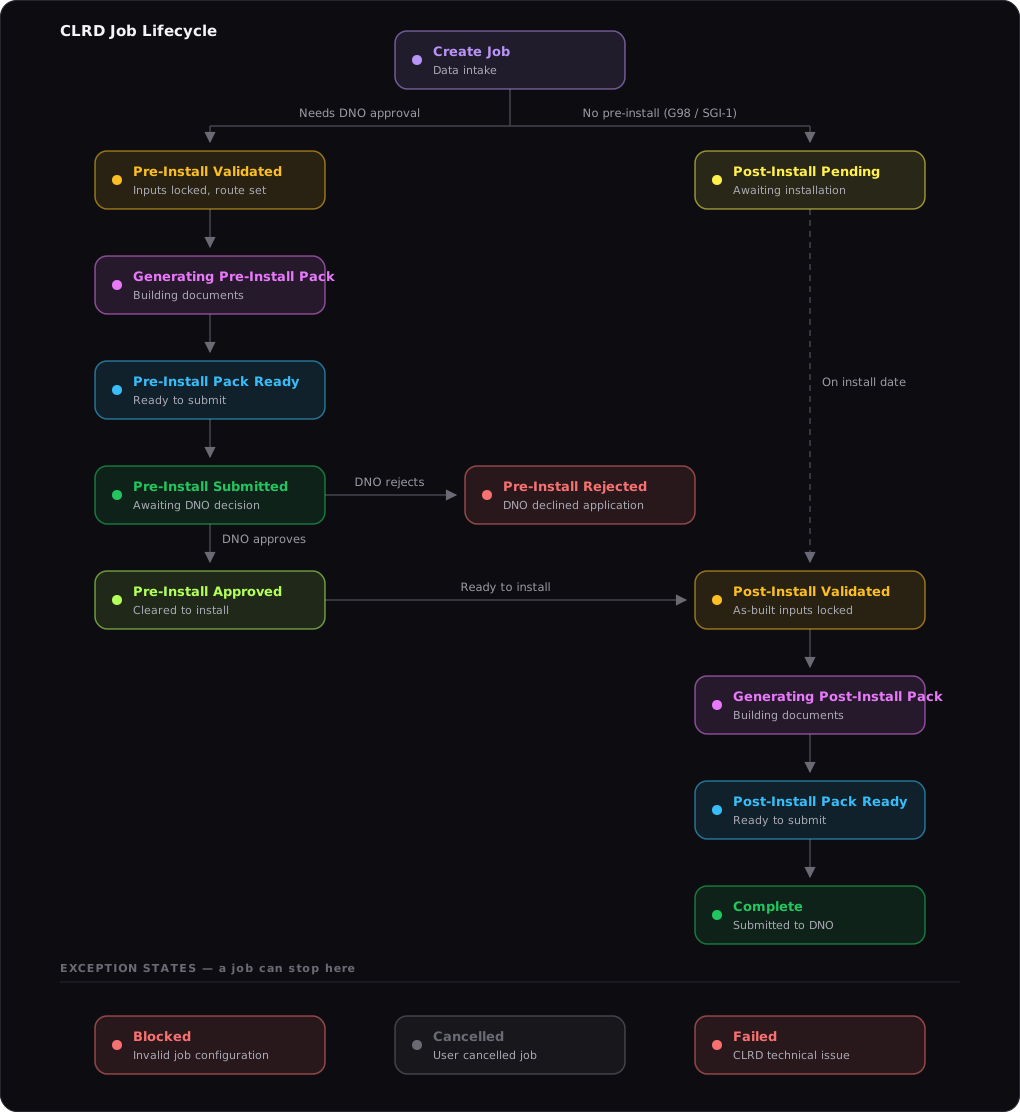
- Create & lock — enter the installation in the wizard; on confirmation the inputs are locked, validated and routed to the right forms.
- Pre-install application (routes that need one: G98 multi-premises, G99 SGI-2/SGI-3, General Type A) — the application pack is generated, submitted to the DNO, and the decision (and any questions) is tracked on the job’s own message thread. Notify-only routes (G98 single premises, SGI-1) skip straight to installation.
- Install & commission — record the actual installation date and confirm commissioning (signed by whoever commissioned the install).
- Post-install notification — the commissioning pack is generated and submitted, and the job reads Notification Submitted until you press Mark Job Complete, once the DNO has acknowledged it and you have passed that on to your client.
If validation fails, the job is blocked with the exact corrective action shown — and a DNO rejection or cancellation is recorded as its own terminal state, ready to duplicate into a corrected resubmission.
Can I correct a job after it’s been sent to the DNO?
Yes, with Amend. On an application, Amend reopens the details until the DNO decides: CLRD rebuilds only the documents that changed and sends them on the job’s DNO thread under an Amendment Letter saying what changed. On a notification (G98, SGI-1, an EV charger or heat pump notification, or a decommissioning), Amend works the same way until you mark the job complete, and can correct the installation date too.
Before anything is sent, Revise corrects the details and regenerates the pack in place. Both ask which step to return to: Client/Site for a typo in the client’s or site’s details, System Details, or Job Extras for the diagram, site map or uploads.
Which G98/G99 forms and procedures are supported?
Full document lifecycle for:
- G98 single premises — post-install Form B1 notification (connect-and-notify; no pre-install application needed).
- G98 multi-premises (Close Geographic Region) — a shared pre-install Form A application pack for the batch + a post-install Form B1 per premises.
- G99 SGI-1 — post-install A3-3 notification (install-then-notify; no pre-install application).
- G99 SGI-2 and SGI-3 — pre-install A1-2 application pack + post-install A3-2 notification pack.
- G99 General Type A within the small-application scope (under 50 kW three-phase / 17 kW single-phase) — pre-install A1-1 application pack + post-install A3-1 notification pack.
- G99 Type A above 50 kW, three-phase and below 1 MW — pre-install Standard Application Form pack + post-install A3-1 notification pack, with the form’s as-installed data.
Does CLRD support SSEN’s G99 fast track?
Yes. SSEN fast-track a G99 SGI-3 application — approving it without first running a full design study — when it carries the electrical measurements taken at the premises on their form FO-NET-CAB-008. It is the only such DNO-specific form any GB operator issues, and CLRD produces it: record the two loop impedance readings, the voltage, the prospective currents (if your meter reports them) and a photograph of the meter mid-measurement in the SSEN Fast Track panel on the Pre-Install Application card, and the completed form is filed with the G99 A1-2 automatically. The second photograph SSEN require — the supply termination — is the job’s own Cut-out Photo, asked for once.
At or below SSEN’s 180 mΩ phase-to-neutral threshold CLRD shows the application is expected to fast-track; above it, that it isn’t — SSEN’s procedure puts it back to a full application with a design study. Either way the measurements never change which G98/G99 documents the job needs, and the reading itself never blocks the job. Generate waits only until you record the test, limit export or file as Type A.
For the measurement method — SSEN’s prescribed procedure, the threshold and the photographs — see the step-by-step guide: How to do the SSEN fast-track impedance test.
UK Power Networks ask for the same reading on an unlimited SGI-3 application above 6 kW a phase — “the ohms reading for this site”, the alternative being a normal A1-1 application of up to 45 working days — but have no form and no published threshold. CLRD answers it with a one-page Loop Impedance Measurement Statement of its own: the readings, the method and the installer’s signed declaration, no photograph. A Loop Impedance Test section appears on a UKPN SGI-3 application in place of the SSEN one, and because UKPN ask after the application is in, the reading can be recorded on an amendment of a submitted application and goes to them with the amended pack.
Either operator asks the question the same way: give us the reading, or file differently. So on an SSEN or UKPN SGI-3 job (at UKPN, one above 6 kW a phase) CLRD asks you to decide before the application is generated — filed without an answer, every such application came back three to four weeks later asking for one, and then the operator’s clock ran again. A recommendation at the top of the job page says so, the loop impedance section is Required, and generation waits until you do one of three things: record the test; press Limit export (16 A per phase: 3.68 kW on each line the generation is on, so 11.04 kW only where it uses all three), after which the operator fast-tracks on the limit alone and asks for no reading; or press File as Type A, which files the G99 A1-1 to the operator’s standard applications team — they run the network study themselves and issue a connection offer, so no test is needed. The two buttons are one click each and go through the ordinary Revise, so the details are replaced and the documents regenerate. Once the application is with the operator, press Amend and the amendment puts the same three choices, which you generate and submit before or after their letter comes. An amendment is the only way CLRD changes or adds to an application the operator already holds.
For practical notes on the route divisions, and the ways around a loop impedance test, see the guide: What is fast track?
How long does DNO approval take — and when can I install?
It depends on the route CLRD assigns the moment your job validates:
- G98 and G99 SGI-1 — connect-and-notify: no DNO approval needed. Install at any time, then submit the notification through CLRD within 28 days of commissioning. (The exception is a G98 multi-premises batch, whose shared Form A is approved before installation — see the batch question below.)
- G99 SGI-2 — an application first, but usually fast-tracked: the DNO will usually assess it within 10 working days.
- G99 SGI-3 — sometimes fast-tracked, but don’t bet on it: within 10 working days the DNO tells you whether a design study is needed first — and if one is, approval can take many weeks. (On SSEN, filing their fast-track measurements form — above — is what earns the fast track.)
- G99 General Type A — the DNO always performs a design study, so approval can take up to 10 weeks; in practice applications filed through CLRD usually come back in 3 to 4 weeks.
- G99 Type A above 50 kW (the Standard Application Form) — the DNO has 45 working days from a complete application to make its connection offer, or 65 where its own works reach high voltage (a national guaranteed standard). Some DNOs attend the commissioning tests at this size, so allow for their notice.
- EV charge points & heat pumps — sometimes an application and approval first, sometimes connect-and-notify like G98/SGI-1: CLRD decides from the ENA form’s own criteria (the equipment, and the premises supply details).
On the application routes, the proposed installation date must sit at least 10 working days and less than 3 months after submission — CLRD checks that window before generating the application. The Standard Application Form asks for no date.
Tip 1: export limitation can buy a faster route. If the job has none, consider adding a scheme where your client has a G100-compatible device and accepts the cap; if it has one, consider a lower limit — where the units’ capacities allow, an export limit at or under 32 A per phase moves a General Type A application into SGI-3, and at or under 16 A per phase moves SGI-3 into SGI-2. On a job you’ve already created, change the scheme with Revise before the application is submitted, or with Amend after it. The job keeps its DNO thread and reference either way.
Tip 2: on a three-phase or split / two-phase supply with more than one single-phase inverter, balance them across the phases — and set each device’s Line Phase Connection to the line it is actually wired to. The aggregate the thresholds test is the most loaded phase, so balancing can keep every line below a procedure’s per-phase ceiling and land the faster route (it also avoids the 32 A phase-imbalance block). With microinverters, enter one row per line, each with the Quantity wired to that line.
For practical notes on the route divisions, and the ways around a loop impedance test, see the guide: What is fast track?
What installation types does CLRD support?
Domestic and commercial PV solar (with or without attached storage) and battery-only installations, up to 1 MW, and — with or without generation on site — EV charge points, V2G chargers and heat pumps (on a site up to 50 kW).
Can I use CLRD for EV charge points or vehicle-to-grid?
Yes — first-class support. EV charge points and heat pumps are picked from the imported ENA charge-point and heat-pump registers, and any job that includes one produces the official ENA EVCP & HP Connections Form alongside (or, for load-only jobs, instead of) the G98/G99 forms — deciding connect-and-notify versus apply-before-install by the form’s own criteria.
A V2G charger is handled as electricity storage on the generation side, routing on its export capacity like any battery.
Which inverters are supported?
All ~7,000 ENA-registered Fully Type Tested single- and three-phase inverters. Single-phase inverters on a single-phase supply, or on PH1 and PH2 of a split / two phase supply; on a three-phase supply, single- and three-phase devices mix freely, with generation and demand totalled per line. That is for the devices being installed. An existing device stays under the standard it was commissioned to, so the existing-device row also takes an ENA listing the register no longer approves or never fully type tested, and a FIT-era device that predates the register (pre-2019, EREC G83 / G59), declared from its rating plate through the row’s Other Device button.
Microinverters are supported too: systems such as the Enphase IQ8 or Hoymiles, with a small inverter behind each panel. Pick the microinverter once and enter the Quantity installed (the field appears for a solar device of 1 kW or less). CLRD totals the system for routing and prints it as one row on the forms, “12 x Enphase Energy” with the device’s register reference and the system’s capacity, and draws it as one microinverter group on the single line diagram. Above 50 kW any solar or battery device takes a Quantity the same way: six identical 50 kW inverters are one row with a Quantity of 6.
Partially type tested devices are supported on a G99 Type A application (Form A1-1, or the Standard Application Form above 50 kW), the route the standard gives them: G98 and the SGI procedures take fully type tested devices only. A device with no ENA type test isn’t supported.
How many devices can a job have?
Up to 15 devices per installation — up to 5 proposed (new) and up to 10 existing on site, mixing solar inverters, batteries, V2G chargers and EV charge-point / heat-pump load devices (load devices don’t count against the generation limits). Where a device list outgrows an ENA form’s printed table, the pack automatically includes a Device Schedule with the complete list.
A microinverter system counts as one device, whatever its size: twelve Enphase IQ8s behind twelve panels are one row with a Quantity of 12, not twelve of the five. Above 50 kW, so does a row of identical solar or battery devices.
Does CLRD support systems over 50 kW?
Yes, up to 1 MW.
- Above 50 kW and below 1 MW, on a three-phase supply, is still Type A, but above the A1-1’s scope it applies with the ENA’s Standard Application Form (SAF). CLRD fills it from the job and a few details entered on the job page: the application before installation, then its as-installed data behind the A3-1. Solar and battery storage, fully or partially type tested; an EV charge point, V2G charger or heat pump on a site above 50 kW isn’t supported.
- 1 MW and over is Type B — not supported.
A SAF job uses no job credits: it is £50 per job, added to your next invoice. Filing more than 5 a month? Contact us for a custom discounted SAF plan.
Does CLRD cover Northern Ireland?
Not yet — CLRD covers Great Britain (England, Scotland and Wales). Northern Ireland connects under a different process with different requirements, so CLRD does not produce jobs for it.
You can still store Northern Ireland sites, and they behave normally everywhere else in the app — only job creation is blocked. If you install in Northern Ireland, contact support to register your interest.
Does CLRD handle export or import limitation (G100)?
Yes — both. Export and import limitation schemes get full-lifecycle G100 support: the official Form A application and Form C commissioning enclosure, for inverter-integrated schemes or stand-alone ENA-registered limiter devices, carried across the forms and the SLD.
Does CLRD handle decommissioning (removing equipment)?
Yes. Mark an existing device Will be decommissioned by this Job and CLRD assesses the installation as it will stand after the works, records the removal on the relevant forms and includes the official decommissioning confirmation — G98 Form D1 or G99 Form D1 — in the pack, together with the updated single line diagram.
Both mixed jobs (old equipment out, new equipment in — a replacement) and decommissioning-only jobs (removal with nothing new installed) are supported.
The DNO never requires approval before decommissioning — but it does require notification of the decommissioning within 28 days, and CLRD produces and submits exactly that.
Does CLRD support multi-premise or batch jobs?
Yes — on every route. A batch job takes one client and an identical system across several sites and creates a standalone job per premises, whether the system routes G98, G99 (SGI or General Type A), EV charge point / heat pump, or mixes generation and load devices. The shared inputs — the signatures, the single-line diagram, the proposed installation date — are captured once on the batch and applied to every premises, and the batch page generates, submits and marks the premises installed together.
One route adds a shared application of its own: where the premises route G98 and form a Close Geographic Region, CLRD produces the shared pre-install G98 Form A covering every premises, submits it to the DNO from the batch’s own contact address, and holds each premises’ installation until that one application is approved — each premises then carrying its own post-install Form B1. On every other route, each premises files its own applications and notifications from its own job.
CLRD decides whether Form A is required from the postcodes: premises sharing a postcode sector are a Close Geographic Region and Form A is mandatory. Where they don’t share one, you confirm whether another CGR condition applies (a single LV feeder, within 500 m, or DNO-confirmed) — if none does, the premises are notified separately with Form B1 instead. Beyond the form’s ten printed rows the pack adds a Premises Schedule listing every premises.
What’s in a CLRD document pack?
Complete DNO paperwork, filled out for you — ready to review, then submitted automatically:
- a DNO Cover Letter — a one-page transmittal so the covering context stays with the pack inside the DNO’s case system;
- complete, fully filled-out G98 / G99 / G100 forms — the right pre-install application and/or post-install notification for the job, routed automatically, including the decommissioning confirmation (G98 Form D1 / G99 Form D1) whenever the job takes equipment off the wall, whether that’s a straight removal or a replacement;
- the ENA EVCP & HP Connections Form whenever the job includes an EV charge point, V2G charger or heat pump;
- a Device Schedule whenever a device list outgrows a form’s printed table — a complete, styled list of every device with its register references and capacities, which the form then refers to;
- a generated single line diagram (SLD) — configurable, and regenerated for minor install-time changes;
- a Site Boundary Map — the property with its boundary outlined and the electricity meter pinned;
- a Letter of Authority (LOA) for the customer to sign;
- commissioning forms and supporting documentation.
Can I customise or upload my own single line diagram?
CLRD generates a configurable SLD and can regenerate it for minor install-time changes (panel configuration, isolators). It handles imbalanced inverters and string arrangements, and you can optionally upload your own SLD instead.
How are signatures collected?
Document packs include a Letter of Authority and collect the customer’s signature whichever way suits — signed in-app on your device, uploaded as an image, or by sending the customer an email or shareable link (e.g. by WhatsApp) so they can sign it themselves. The installer signature is captured in-app or by upload.
The post-install commissioning declaration is signed by whoever actually commissioned the installation — you, a teammate sent their own signing link, or an external commissioner signing under their own company and role.
Does CLRD ever contact my client directly?
No, unless you use a feature that sends your client something, and then only when you press the button:
- A signature request, by email or text, if you choose to send one rather than sign in-app or share the link yourself.
- A copy of the DNO’s approval letter or acknowledgement, when you press Email to Client on the job. CLRD only offers that button when it has detected the letter in the DNO’s replies on the job, and on an application only once you’ve recorded the approval.
Each message makes clear it comes from your company, with CLRD only delivering it, and an emailed reply goes to you, not to CLRD.
Your DNO may contact your client directly, for example to arrange a fuse upgrade, if your client agreed to that when signing.
Who can commission the installation?
CLRD supports installer and non-installer commissioning — including 2nd-party team members and 3rd-party external commissioners. Whoever commissioned the installation is recorded and signs the commissioning declaration: record yourself, send a teammate their own signing link, or send an external / subcontracted commissioner a link to sign under their own company and role. Each declaration prints that commissioner’s name, role and company, and a Commissioning Requests inbox keeps a designated engineer from missing a request.
How do I do a load survey to calculate Premises Maximum Demand?
The Premises Maximum Demand asked for in Supply Details is the highest current the whole property draws at once including the new equipment — count battery and V2G charging too (they draw from the grid), and don’t deduct an import/load-limiting device (declare the scheme instead, and CLRD states the limited figure wherever a form wants it). The ENA EVCP & HP Connections Form weighs it against the cut-out fuse rating and against 60 A per phase (13.8 kVA) to decide connect-and-notify versus apply-before-install. Any equipment passes the 60 A test if the premises is CT metered or a load limiter holds it below the cut-out rating. An EV charge point has no limiter option, and on a CT-metered premises its output must be at most 30% of the Maximum Import Capacity. There are three accepted ways to assess it:
- Calculate it (the load survey) — itemise the property’s circuits and apply the diversity allowances from the IET On-Site Guide (the BS 7671 companion): for example a cooker counts its first 10 A plus 30% of the remainder, and ring finals, water heaters and immersion heaters each carry their own factor. Add the proposed EV charge point or heat pump at full rating, with no diversity — they are long-duration loads. This is the defensible route when there’s no measurement history: a new build, a new occupant, or loads about to change.
- Measure it — a smart meter’s half-hourly history gives the real existing maximum demand (the highest half-hour’s kWh × 2 = kW; divide by 0.23 for amps on a 230 V single phase). Some older meters carry a maximum-demand indicator, or the supply can be clamp-logged over a representative period. Then add the new equipment at full rating on top.
- From supply records — supplier half-hourly data or in-home display history, the same basis as reading the meter.
In practice installers mix them: measure the existing baseline where a smart meter exists, calculate where it doesn’t, and always add the proposed equipment at rating. Enter the result in amps — or, on a CT-metered premises, in kVA totalled across the phases.
For the full method — the diversity allowances, the smart-meter arithmetic and a worked example — see the step-by-step guide: How to do a load survey.
The cut-out label says 60/80A. Which rating do I choose?
Usually Not Known. A 60/80A marking is the cut-out’s own rating: it takes either a 60 A or an 80 A fuse, so it doesn’t say which one is fitted. The fitted fuse’s rating is on the fuse itself, inside the sealed carrier, which only the DNO may open. Choose 60 or 80 only where a label states the fuse actually fitted, or ask the DNO, who hold the record.
The rating doesn’t change which forms a generation-only job (solar, battery) files. It matters only where the job installs an EV charge point, heat pump or V2G charger: there it can decide whether the job notifies after install or applies before it, and with Not Known it applies before install.
What’s the difference between the 13-digit MPAN and the 21-digit Supply Number?
They’re the same identifier at two lengths. The full Supply Number is 21 digits, written as a boxed S followed by two lines of numbers — on the meter, and on the electricity bill. The top line (8 digits) is supplier settlement data: profile class, meter time-switch code and line loss factor. The second line is the 13-digit MPAN, the permanent identity of the connection point — and that is what the DNO, and CLRD’s Site form, ask for.
The MPAN’s last digit is a check digit and its first two are the distributor ID — the DNO whose network the property is on. CLRD verifies the check digit when you enter it — a number taken from the wrong line, or a typo, is caught before it reaches the forms (paste it however it’s spaced; only the digits count) — and reads the distributor ID to fill in the site’s DNO for you.
Don’t confuse either with the meter serial number on the meter’s face (no S symbol) — meters get swapped; the MPAN stays with the property.
How does multi-user team permissions and access work?
An installation company is represented in CLRD as a Team, and every client, site and job you create is owned by the Team rather than by you personally — so work carries on when someone is off or leaves. One team can never see another team’s data.
A team has exactly one Owner and, on any plan above Individual Installer, as many members as you like. The Owner is responsible for the team and its subscription and billing. They can transfer ownership to another member from that member’s page under Team, unless their own account has a paid plan, a saved card, managed filing fees not yet invoiced, bolt-on credits or features CLRD has added. Support moves those across with the company. Closing the team down is theirs alone — the Owner’s account can only be deleted once the team has been handed over or emptied.
The Owner invites members from the Team page, and sets each one’s permissions there or in the invitation itself:
- Job access — Own jobs only (the default: they create jobs and see the ones they created), View all jobs, Edit all jobs (act on any of the team’s jobs — generate, submit, reply to the DNO), or No job access, which is the only setting that also stops them creating jobs.
- Allow Commissioning — on by default. Off, the member drops out of the commissioning flow entirely: no Commissioning Requests inbox, and teammates can no longer pick them as the commissioner.
- Allow Managing Members — off by default. On, the member can invite, edit and remove other members, without being the Owner — useful when the Owner is on site and a new starter needs an account. They can’t touch the Owner or another member who manages members, they can’t hand this permission out themselves, and they get no access to billing.
The last two combine usefully. A member set to No job access with commissioning left on is a commissioner-only account — they receive signing requests and sign them, and never see the jobs list. Office staff who manage members but have no business in the jobs work the same way. And No job access is also how you stand a member down for a while without removing them from the team.
The Owner always holds every permission, and permission changes are recorded on the account audit trail. Agencies work differently — an agency team represents several installation companies and files on their behalf; ask us about it if that is your model.
How do I see how many job credits I have left?
The account menu at the top right gives a quick view: the jobs used against your allowance, and any bolt-on credits. Settings → Billing shows the full picture for your trial or plan. A credit is used the first time a job’s documents are generated, never when the job is created.
Do I get an invoice when I pay for a plan?
Yes. Payments are taken by Stripe, which emails an invoice or receipt for each one to the billing email on your account. Settings → Billing also lists your past payments, each with its invoice to download, and Manage Billing opens Stripe’s own record, where you can also update your card.
How often does the Dashboard summary update?
At most once a day. The first time you open the Dashboard 24 hours or more after the last summary, CLRD checks whether your jobs have changed. If they have, it writes a new summary, which takes 10 to 15 seconds and appears on the page by itself. If nothing has changed, the last summary stays. Each person’s summary covers the jobs on their own Dashboard, not the whole team’s.
Is there an API? Can CLRD connect to my CRM?
Yes — the CLRD API (v1; the Volume Operations and Multi Team Operations plans) lets your CRM or own tooling manage clients, sites and full-lifecycle compliance jobs, upload and download document packs, read and reply to the DNO message thread, and receive signed webhooks as jobs progress. Records created through the API live in CLRD just like ones created in the app — the full lifecycle on every record, not a one-shot “data in, PDF out” call.
The API is for your own company’s benefit — your team, and people building on your behalf, through your own software or third-party tools connected to your account. Reselling API access, or building CLRD into a commercial software product sold to its own customers, requires our prior approval — get in touch about a partner agreement before you integrate.
See the API documentation for the full reference.
Can I import my existing clients and sites? Do I get my data back out?
Yes — every CLRD account includes CSV import and export, no API or plan requirement. Bring your client and site book in from any spreadsheet or CRM export (each row is validated like the normal forms, and skipped rows are reported by line number), and export it back out any time as plain CSV files that round-trip through import — your data is never locked in. The Jobs page adds a reporting export: one row per job with its status, G98/G99 routing, client and site, and system totals. It also carries each job’s key dates, from the customer’s signature to the notification, and where it stands, named as in the jobs report.
See the CSV documentation for the format and column reference.
Step-by-step guides to the assessments behind the forms — each one self-contained, and linked from the CLRD fields it feeds.
Ready to see it on your own jobs?